DNS Tools
View allRecord lookup
DNS LookupAll DNS RecordsMX LookupTXT LookupMore records
CNAME LookupSOA LookupNS LookupCAA LookupAdvanced
PTR LookupDNSSEC CheckCAA Generator
XcellSecure Microsoft Copilot Training
Microsoft Copilot Training from XcellHost
What you’ll get from Copilot training
Free, expert-led training to explore the fundamentals of Microsoft 365 Copilot — and apply them the same day.
Build your AI skills
Discover how to use the power of AI to simplify everyday tasks — build foundational AI skills, learn to create prompts that deliver results, and get the most from Copilot in the apps you use every day.
Role-based topics
AI training for roles in executive leadership, finance, IT, sales and more. Designed for users of all levels, it delves into how Copilot enhances your work by automating daily tasks.
Real-world examples
Learn how Copilot boosts productivity and creativity through real use cases — with step-by-step instructions and practical demos, you gain proficiency and confidence fast.
Chat with Microsoft experts
Ask questions and get answers on how to automate daily tasks with AI, so you can focus on the bigger challenges.
Explore the power of AI
Discover what’s possible with AI-powered Microsoft 365 Copilot — whatever your role.
Explore the power of AI
Discover what’s possible with AI-powered Microsoft 365 Copilot and how it boosts productivity in any role.
Transform your workflows
Gain the skills to confidently use Copilot’s key features, transform your workflows and streamline productivity.
Accomplish more in less time
Explore how Copilot works seamlessly with your favourite apps, helping you do more, faster.
Continue learning
Get access to additional content, learning opportunities and resources on Microsoft Learn.
Copilot in the tools you use every day
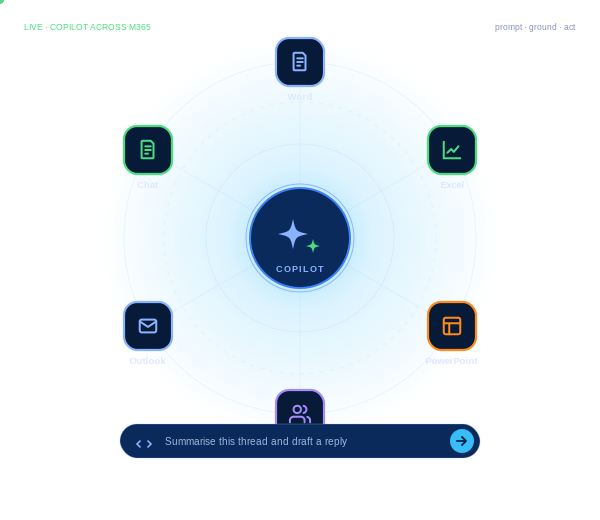
Training covers common prompt flows across Word, Excel, PowerPoint, Teams, Outlook and Copilot Chat — including the difference between work- and web-grounded data.
Word
Draft, rewrite and summarise documents — from a blank page to a polished draft in seconds.
Excel
Analyse data, spot trends, build formulas and generate charts with a plain-English prompt.
PowerPoint
Turn a document or a prompt into a designed deck — and restyle or condense it instantly.
Teams
Recap meetings, capture action items and catch up on chats you missed — automatically.
Outlook
Summarise long threads, draft replies in your tone and triage your inbox faster.
Copilot Chat
Ask across your work data or the web, and use agents for complex, multi-step tasks safely.
Pick the format that fits your team
From a free introductory session to a full adoption programme — in person or online, scheduled around you.
Introductory session
Free · 60–90 minGet started with Copilot — what it is, how it grounds responses in your data, and a first set of prompts.
- Live expert-led demo
- Foundational AI skills
- Q&A with our team
- In-person or online
Role-based workshop
Half dayHands-on Copilot for a specific team — leadership, finance, IT, sales, HR or operations.
- Role-specific scenarios
- Guided hands-on prompts
- Prompt library for your team
- In your own tenant
Adoption programme
Multi-sessionA structured rollout to drive real Copilot adoption across the whole organisation.
- Blended live + self-paced
- Champions enablement
- Adoption tracking & reporting
- Governance & safe-use guidance
Copilot training for every role
Executive leadership
Make faster, better-informed decisions with AI-summarised insights.
Finance
Analyse, model and report in Excel and beyond — in a fraction of the time.
IT
Adopt and govern Copilot safely, and support the rest of the business.
Sales & marketing
Draft proposals, recap calls and create content faster with Copilot.
HR & operations
Automate documents, policies and everyday admin across your teams.
Every employee
Get more done in Word, Excel, Teams and Outlook — whatever the role.
From goals to hands-on in four steps
Delivered by XcellHost, a Microsoft partner.
Tell us your goals
Share your team, roles and what you want from Copilot — adoption, a specific workflow, or a first look.
We tailor the session
We shape the demos, prompts and scenarios to your roles and, where you like, your own tenant.
Live training day
Expert-led demos, hands-on prompting and Q&A — your team leaves with a working prompt library.
Keep going
Follow-up resources, Microsoft Learn paths and optional ongoing enablement to embed the habit.
When customers ask what protects Microsoft Copilot Training, the answer is a small number of controls applied consistently. Access is the control that matters most in a hosted environment, so it is treated as the primary boundary rather than an afterthought.
XcellHost is ISO 27001 and ISO 20000-1 certified · Indian Tier-4 datacenters · DPDPA and RBI aligned · 24×7 NOC and SOC.
Microsoft Copilot Training gave us a clearer way to handle 99.95% uptime sla. The rollout was well organised, and the support team stayed responsive throughout.
We chose Microsoft Copilot Training because enterprise security mattered to our team. It now fits naturally into our day-to-day workflow.
The biggest improvement with Microsoft Copilot Training has been free migration. We have better clarity, dependable support and fewer operational surprises.
Training introduces practical ways to use Copilot for everyday tasks, including drafting content, summarising information and preparing presentations.
Sessions can be planned for business users, team leaders, executives and IT teams. Choose a format that matches your experience and goals.
Introductory sessions start with the basics. Advanced workshops may require familiarity with Microsoft 365 applications.
Depending on the selected programme, sessions can explore Copilot in Word, Excel, PowerPoint, Outlook and Teams.
Hands-on activities may require an eligible Microsoft 365 subscription and Copilot access. Confirm the requirements before your session.
Prompting exercises can cover clear instructions, useful context and refining responses. The activities depend on your chosen workshop.
Share your roles, common tasks and learning objectives so a suitable training plan can be discussed.
Virtual and on-site options can be discussed during planning. Availability depends on the programme, location and schedule.
Sessions can cover reviewing generated content, checking accuracy and handling business information according to your organisation’s policies.
Contact XcellHost with your team size, preferred format and learning goals to discuss availability and a training plan.
Fresh Perspectives For Smarter IT Decisions
Explore practical guides and expert insights on cloud, cybersecurity and Indian compliance to help your business move forward.
New insights are on the way. Explore all insights for more guides and articles.
Ready to start with Microsoft Copilot Training?
FREE Consultation · FREE Demo · FREE Trial · 24×7 support in English & Hindi